SNES Breakout Tutorial
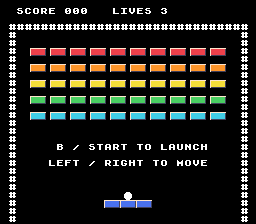
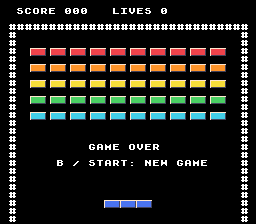
Build a complete SNES game in C with PVSnesLib. Here's the finished game after Part 4:
Along the way, you'll use:
- Graphics: tile-map backgrounds, animated sprites and metasprites.
- Effects: scrolling, fades, mosaic, and HDMA color gradients.
- Hardware: SPC700 music and sound effects, SRAM saves, and SNES Mouse input.
Try the finished game!
Download the finished Part 4 ROMRead on the tutorial site · Part 1: The Core Mechanics · Part 2 · Part 3 · Part 4
Part 1: The Core Mechanics
Play the game you're about to build!
Download the Part 1 ROMLaunch the completed game in a SNES emulator, then build your own from scratch.
You should know basic C: variables, functions, loops, arrays, pointers, and structs. You do not need assembly or prior SNES programming experience.
By the end of Part 1 you will have a paddle, a bouncing ball, fifty colored bricks, scoring, three lives, and win/game-over screens with restarting. This first version has one level and no sound. It is an original Breakout-style exercise.
Contents
- Install PVSnesLib and run Hello World
- Draw a paddle and move it
- Attach a ball and launch it
- Move the ball and bounce off walls
- Bounce off the paddle
- Add a wall of destructible bricks
- Add lives, winning, and restarting
- Draw the score, lives, and prompts
See also troubleshooting and official references.
1. Install PVSnesLib and run Hello World
Follow the official PVSnesLib installation guide for your operating system. This tutorial uses PVSnesLib 4.6.0.
Before continuing, compile the SDK's snes-examples\hello_world example and run it in a SNES emulator.
Checkpoint: Hello World compiles and displays its message in the emulator. You're ready for step 2.

2. Draw a paddle and move it
Create your project inside the installation
Create an empty breakout folder inside your SDK's snes-examples folder. For an SDK installed at C:\snesdev\pvsneslib, the full project path is C:\snesdev\pvsneslib\snes-examples\breakout.
Create a src folder inside it: C:\snesdev\pvsneslib\snes-examples\breakout\src. Use your own SDK location if it differs from this example. Open the breakout folder in your editor and run the build commands from there.
Open Makefile
Create Makefile in that directory. Its name is exactly Makefile, with no extension (some editors, such as Notepad, quietly add .txt):
Goal: Configure a ROM build that uses the surrounding SDK installation.
Makefile — create or replace the entire file:
export PVSNESLIB_HOME ?= $(abspath $(CURDIR)/../..)

ifeq ($(wildcard $(PVSNESLIB_HOME)/devkitsnes/snes_rules),)
$(error PVSnesLib not found at $(PVSNESLIB_HOME). Place this project in snes-examples/breakout or set PVSNESLIB_HOME)
endif

export ROMNAME := breakout
export ROMTITLE := BREAKOUT TUTORIAL

include $(PVSNESLIB_HOME)/devkitsnes/snes_rules

.PHONY: all clean

all: $(ROMNAME).sfc

clean: cleanBuildRes cleanRom cleanGfx
The Makefile is your game's build script. It defines what gets built and how PVSnesLib turns your code and artwork into breakout.sfc.
Open src\main.c
Create src\main.c with this entire program:
Goal: Display a text message before adding gameplay or graphics assets.
src\main.c — create or replace the entire file:
#include <snes.h>

int main(void)
{
    setScreenOff();
    consoleInitDefaultText(0);
    bgSetGfxPtr(0, 0x3000);
    bgSetMapPtr(0, 0x6800, SC_32x32);
    setMode(BG_MODE1, 0);
    bgSetDisable(1);
    bgSetDisable(2);
    consoleDrawText(7, 12, "MY FIRST BREAKOUT");
    setScreenOn();

    while (1)
    {
        WaitForVBlank();
    }
    return 0;
}
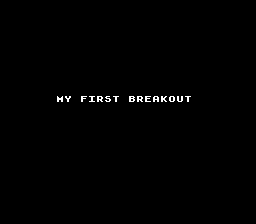
The program initializes the font and text map while the screen is off, selects Mode 1, and writes the message into the console buffer. WaitForVBlank lets the library transfer that buffer each frame.
Build:
makeThe output is long, and the linker prints harmless messages such as Label "SECTIONSTART_.rodata" was defined more than once and DISCARD: ... was discarded. The build worked if the output ends with Build finished successfully ! and breakout.sfc now exists. A real failure stops with an error message and never prints that line.
Open your new project's breakout.sfc in the emulator.
SNES Terminology
The SNES assembles its picture from tiles, rather than drawing arbitrary rectangles into a modern framebuffer:
| Term | What we will use it for |
|---|---|
| Tile | An 8-by-8 piece of artwork. |
| Palette | Colors selected by the artwork's color indices. |
| Background | A tile grid; ours holds text and a border. |
| Sprite | A movable object: paddle, ball, or brick. |
| VRAM | Graphics memory holding tiles and background maps. |
| OAM | The table of sprite positions, sizes, and artwork. |
| VBlank | The pause between frames when the library transfers graphics updates. |
Our screen is 256 by 224 pixels. X increases rightward; Y increases downward. Sprites use pixel coordinates, but console text uses 8-by-8 character cells. consoleDrawText(2, 1, "HELLO") starts at pixel (16, 8).
Checkpoint: Build and open breakout.sfc. The screen displays MY FIRST BREAKOUT, confirming that the compiler, ROM build, and text layer work.
Adding graphics
Copy sprites.png from your repository copy into your new project's root, beside Makefile.

The original sheet is a 128-by-16 indexed PNG. Across the top are five brick colors, a paddle segment, and a ball. The lower eight rows are transparent.
Open Makefile
Add the conversion rule to your Makefile, between all and clean:
Goal: Convert the indexed sprite artwork before assembling its ROM data.
Makefile — in the file, apply these changes:
all: $(ROMNAME).sfc


clean: cleanBuildRes cleanRom cleanGfx
all: $(ROMNAME).sfc

sprites.pic: sprites.png
	$(GFXCONV) -s 8 -R -o 16 -u 16 -p -t png -i $<
src/data.obj: sprites.pic
clean: cleanBuildRes cleanRom cleanGfx
The new $(GFXCONV) command must start with a real tab, not spaces.
The converter will generate two files for you: sprites.pic, containing the tile graphics, and sprites.pal, containing their colors. It also writes sprites.inc and sprites_data.as, which this tutorial does not use. -R preserves tile order, -u 16 selects 4-bit pixels, -o 16 outputs sixteen colors, and -p requests a palette.
Open src\data.asm
Create src\data.asm:
Goal: Include the converted sprite tiles and palette in the ROM.
src\data.asm — create or replace the entire file:
.include "hdr.asm"

.section ".breakout_assets" superfree

sprite_tiles:
.incbin "sprites.pic"

sprite_palette:
.incbin "sprites.pal"

.ends
These labels let C refer to the binary graphics.
Keep gameplay separate from SNES drawing
Gameplay files track what the game does; main.c handles SNES input and drawing. Put rules and state changes in game.c, and their shared types and function declarations in game.h. If a function needs PVSnesLib hardware calls, it belongs in main.c.
Open src\game.h
Create src\game.h. For now, the game contains only a paddle position:
Goal: Define a hardware-independent interface for paddle movement.
src\game.h — create or replace the entire file:
#ifndef BREAKOUT_GAME_H
#define BREAKOUT_GAME_H

#define FIELD_LEFT  16
#define FIELD_RIGHT 240

#define PADDLE_WIDTH  48
#define PADDLE_HEIGHT 8
#define PADDLE_Y      200
#define PADDLE_SPEED  3

typedef struct Game
{
    int paddle_x;
} Game;

void game_reset(Game *game);
void game_tick(Game *game, int movement, int action_pressed);

#endif
Game is the shared state connecting gameplay to drawing: game.c updates its fields, and main.c reads them to decide what to draw. For now it stores only the paddle's horizontal position; later we'll add the ball, bricks, and score. Constants define the paddle's size, speed, and bounds; resetting and ticking are separate operations.
Open src\game.c
Create src\game.c:
Goal: Move the paddle without allowing either end to cross a wall.
src\game.c — create or replace the entire file:
#include "game.h"

void game_reset(Game *game)
{
    game->paddle_x = (FIELD_LEFT + FIELD_RIGHT - PADDLE_WIDTH) / 2;
}

void game_tick(Game *game, int movement, int action_pressed)
{
    (void)action_pressed; /* Silence the unused-parameter warning for now. */
    game->paddle_x += movement * PADDLE_SPEED;
    if (game->paddle_x < FIELD_LEFT)
    {
        game->paddle_x = FIELD_LEFT;
    }
    if (game->paddle_x + PADDLE_WIDTH > FIELD_RIGHT)
    {
        game->paddle_x = FIELD_RIGHT - PADDLE_WIDTH;
    }
}
movement will be -1, 0, or 1. The unused action parameter is reserved for launching in the next step. Signed positions allow subtraction without unsigned wraparound; our values fit the SNES compiler's 16-bit int.
Open Makefile
Add the header dependency to your Makefile:
Goal: Rebuild both C files when their shared gameplay header changes.
Makefile — in the file, apply these changes:
	$(GFXCONV) -s 8 -R -o 16 -u 16 -p -t png -i $<

src/data.obj: sprites.pic


clean: cleanBuildRes cleanRom cleanGfx $(GFXCONV) -s 8 -R -o 16 -u 16 -p -t png -i $<
src/data.obj: sprites.pic
src/main.obj src/game.obj: src/game.h
clean: cleanBuildRes cleanRom cleanGfxThis dependency makes both object files rebuild when src\game.h changes.
Open src\main.c
Now replace the text-only src\main.c with this complete paddle version:
Goal: Draw the three-piece paddle and translate controller input into gameplay.
src\main.c — create or replace the entire file:
#include <snes.h>
#include "game.h"

extern u8 sprite_tiles[];
extern u8 sprite_palette[];

Game game;

static void draw_game(void)
{
    int i;

    for (i = 0; i < 3; ++i)
    {
        oamSetXY((i + 1) * 4, game.paddle_x + i * 16, PADDLE_Y);
    }
}

static void init_video(void)
{
    int row;
    int i;

    setScreenOff();
    consoleInitDefaultText(0);
    bgSetGfxPtr(0, 0x3000);
    bgSetMapPtr(0, 0x6800, SC_32x32);
    oamInitGfxSet(sprite_tiles, 1024, sprite_palette, 32, 0, 0x0000,
                  OBJ_SIZE8_L16);

    setMode(BG_MODE1, 0);
    bgSetDisable(1);
    bgSetDisable(2);
    oamClear(0, 0);
    for (i = 0; i < 3; ++i)
    {
        oamSet((i + 1) * 4, game.paddle_x + i * 16, PADDLE_Y, 3, 0, 0, 10, 0);
        oamSetEx((i + 1) * 4, OBJ_LARGE, OBJ_SHOW);
    }

    consoleDrawText(1, 3, "##############################");
    for (row = 4; row < 28; ++row)
    {
        consoleDrawText(1, row, "#");
        consoleDrawText(30, row, "#");
    }
    draw_game();
    setScreenOn();
}

int main(void)
{
    u16 held;
    u16 pressed;
    int movement;

    game_reset(&game);
    init_video();

    while (1)
    {
        WaitForVBlank();
        held = padsCurrent(0);
        pressed = padsDown(0);
        movement = 0;
        if (held & KEY_LEFT)
        {
            --movement;
        }
        if (held & KEY_RIGHT)
        {
            ++movement;
        }
        game_tick(&game, movement, pressed & (KEY_B | KEY_START));
        draw_game();
    }
    return 0;
}
The paddle is three 16-by-16 sprites. Only their top eight pixels are visible, so its collision rectangle will be 48 by 8. The SNES does not offer a 16-by-8 hardware sprite size.
oamSet takes an OAM byte offset, X, Y, priority, flip X, flip Y, tile number, and palette. Entries 1, 2, and 3 use offsets 4, 8, and 12. Entry 0 is reserved for our future ball. OBJ_SIZE8_L16 selects 8-by-8 small sprites and 16-by-16 large sprites.
There are sixteen tiles per row in this sheet. A large sprite starting at tile 10 uses tiles 10, 11, 26, and 27. The transparent bottom row keeps the paddle eight pixels tall.
Our VRAM plan uses word addresses: sprite tiles at 0x0000, font at 0x3000, and text map at 0x6800. Upload lengths, such as 1,024, are in bytes. Keep these non-overlapping allocations unchanged for now.
padsCurrent(0) reads held buttons; padsDown(0) reads newly pressed buttons. Left and Right together cancel out. WaitForVBlank() keeps input refreshing and lets the library transfer its sprite/text buffers. Do not add an oamUpdate() call or replace the frame wait with a delay.
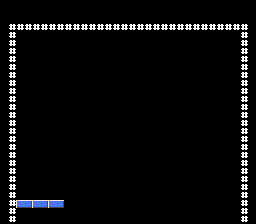
makeCheckpoint: only a border and paddle appear. Left/Right moves the paddle, and it stops at both walls. There is still no ball and nothing to launch. If the paddle does not move, map controller 1 (the D-pad, B, and Start) in your emulator's input settings and click its window so that it receives the input.
3. Attach a ball and launch it
We will first implement the ball's state, without motion. That gives us a small testable change before physics.
Open src\game.h
Edit src\game.h:
Goal: Give the ball an 8-by-8 collision rectangle.
src\game.h — in the file, apply these changes:
#define FIELD_LEFT  16
#define FIELD_RIGHT 240


#define PADDLE_WIDTH  48
#define PADDLE_HEIGHT 8
#define PADDLE_Y 200#define FIELD_LEFT 16
#define FIELD_RIGHT 240
#define BALL_SIZE 8
#define PADDLE_WIDTH 48
#define PADDLE_HEIGHT 8
#define PADDLE_Y 200BALL_SIZE will be shared by positioning, rendering, and collision checks.
Goal: Define names for the ready and playing game states.
src\game.h — in the file, apply these changes:
#define PADDLE_Y      200
#define PADDLE_SPEED  3


typedef struct Game
{
int paddle_x;#define PADDLE_Y 200
#define PADDLE_SPEED 3
enum GameState
{
STATE_READY,
STATE_PLAYING
};
typedef struct Game
{
int paddle_x;The enum names the two states; motion will later run only in STATE_PLAYING.
Goal: Store the ball's position, velocity, and launch state.
src\game.h — in the file, apply these changes:
typedef struct Game
{
    int paddle_x;


} Game;

void game_reset(Game *game);typedef struct Game
{
int paddle_x;
int ball_x;
int ball_y;
int vx;
int vy;
int state;
} Game;
void game_reset(Game *game);The coordinates locate the ball, velocities describe its movement, and state determines whether it remains attached.
Open src\game.c
Add attach_ball immediately after the include in src\game.c, then update the two existing functions:
Goal: Center the ball above the paddle and prepare its launch velocity.
src\game.c — add this complete attach_ball function immediately before game_reset:
static void attach_ball(Game *game)
{
    game->ball_x = game->paddle_x + (PADDLE_WIDTH - BALL_SIZE) / 2;
    game->ball_y = PADDLE_Y - BALL_SIZE;
    game->vx = 1;
    game->vy = -3;
}
The helper derives both coordinates from the paddle rather than storing a separate attachment offset.
Goal: Start each game with the ball attached and waiting to launch.
src\game.c — in game_reset, apply these changes:
void game_reset(Game *game)
{
    game->paddle_x = (FIELD_LEFT + FIELD_RIGHT - PADDLE_WIDTH) / 2;


}void game_reset(Game *game)
{
game->paddle_x = (FIELD_LEFT + FIELD_RIGHT - PADDLE_WIDTH) / 2;
game->state = STATE_READY;
attach_ball(game);
}Resetting selects STATE_READY before positioning the ball.
Goal: Let the tick function use its action-button argument.
src\game.c — in game_tick, apply these changes:
void game_tick(Game *game, int movement, int action_pressed)
{
(void)action_pressed; /* Silence the unused-parameter warning for now. */ // [!code --]
game->paddle_x += movement * PADDLE_SPEED;
if (game->paddle_x < FIELD_LEFT)
{void game_tick(Game *game, int movement, int action_pressed)
{
game->paddle_x += movement * PADDLE_SPEED;
if (game->paddle_x < FIELD_LEFT)
{The unused-argument cast is no longer needed because the next branch reads it.
Goal: Keep the ball attached until a fresh action press launches it.
src\game.c — in game_tick, apply these changes:
if (game->paddle_x + PADDLE_WIDTH > FIELD_RIGHT)
{
game->paddle_x = FIELD_RIGHT - PADDLE_WIDTH;
}
} if (game->paddle_x + PADDLE_WIDTH > FIELD_RIGHT)
{
game->paddle_x = FIELD_RIGHT - PADDLE_WIDTH;
}
if (game->state == STATE_READY)
{
attach_ball(game);
if (action_pressed)
{
game->state = STATE_PLAYING;
}
return;
}
}The centering offset is (48 - 8) / 2, or 20 pixels. vx and vy are velocities; negative Y will mean upward movement. A new B/Start press launches, not a continuously held button.
Open src\main.c
Add the ball's drawing and initial sprite definition in src\main.c:
Goal: Make the ball sprite follow the ball's gameplay coordinates.
src\main.c — in draw_game, apply these changes:
{
int i;
for (i = 0; i < 3; ++i)
{
oamSetXY((i + 1) * 4, game.paddle_x + i * 16, PADDLE_Y);
}{
int i;
oamSetXY(0, game.ball_x, game.ball_y);
for (i = 0; i < 3; ++i)
{
oamSetXY((i + 1) * 4, game.paddle_x + i * 16, PADDLE_Y);
}Updating OAM entry 0 changes the ball's displayed position each frame.
Goal: Give the ball its artwork and small hardware sprite size.
src\main.c — in init_video, apply these changes:
bgSetDisable(1);
bgSetDisable(2);
oamClear(0, 0);
for (i = 0; i < 3; ++i)
{
oamSet((i + 1) * 4, game.paddle_x + i * 16, PADDLE_Y, 3, 0, 0, 10, 0); bgSetDisable(1);
bgSetDisable(2);
oamClear(0, 0);
oamSet(0, game.ball_x, game.ball_y, 3, 0, 0, 12, 0);
oamSetEx(0, OBJ_SMALL, OBJ_SHOW);
for (i = 0; i < 3; ++i)
{
oamSet((i + 1) * 4, game.paddle_x + i * 16, PADDLE_Y, 3, 0, 0, 10, 0);The ball uses tile 12, offset 0, and the small 8-by-8 sprite size.
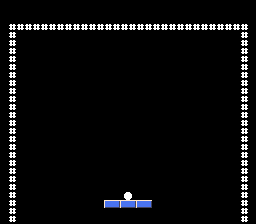
makeCheckpoint: the ball follows the paddle. Press B or Start: it stays at its launch position while the paddle can move away. This frozen launched ball is intentional; we have not written its movement yet.
4. Move the ball and bounce off walls
Open src\game.h
Add the vertical bounds and substep limit in src\game.h:
Goal: Define the top wall and the bottom boundary where the ball is lost.
src\game.h — in the file, apply these changes:
#ifndef BREAKOUT_GAME_H
#define BREAKOUT_GAME_H
#define FIELD_LEFT 16
#define FIELD_RIGHT 240
#define BALL_SIZE 8
#define PADDLE_WIDTH 48#ifndef BREAKOUT_GAME_H
#define BREAKOUT_GAME_H
#define FIELD_LEFT 16
#define FIELD_RIGHT 240
#define FIELD_TOP 32
#define FIELD_BOTTOM 224
#define BALL_SIZE 8
#define PADDLE_WIDTH 48FIELD_TOP is a reflecting boundary; FIELD_BOTTOM is an offscreen loss threshold, not a wall.
Goal: Limit each frame to three one-pixel movement attempts per axis.
src\game.h — in the file, apply these changes:
#define FIELD_BOTTOM 224
#define BALL_SIZE 8
#define PADDLE_WIDTH 48
#define PADDLE_HEIGHT 8
#define PADDLE_Y 200#define FIELD_BOTTOM 224
#define BALL_SIZE 8
#define BALL_SUBSTEPS 3
#define PADDLE_WIDTH 48
#define PADDLE_HEIGHT 8
#define PADDLE_Y 200Instead of jumping several pixels and then checking overlap, test each one-pixel candidate position. If it crosses a wall, reverse the velocity and keep the old position. This will also prevent jumping through thin bricks later. X and Y are handled separately, with X first at corners.
Open src\game.c
In src\game.c, insert magnitude before attach_ball, and the movement helpers between game_reset and game_tick:
Goal: Count movement steps independently of the velocity's direction.
src\game.c — add this complete magnitude function immediately before attach_ball:
static int magnitude(int value)
{
if (value < 0)
{
return -value;
}
return value;
}magnitude returns the positive size of a signed velocity.
Goal: Reject horizontal positions beyond the walls and reverse direction.
src\game.c — add this complete move_ball_x function immediately before game_tick:
static void move_ball_x(Game *game)
{
int next_x;
next_x = game->ball_x + (game->vx > 0 ? 1 : -1);
if (next_x < FIELD_LEFT || next_x + BALL_SIZE > FIELD_RIGHT)
{
game->vx = -game->vx;
}
else
{
game->ball_x = next_x;
}
}The helper attempts one pixel in the velocity's direction. A collision reverses vx without moving into the wall.
Goal: Reflect the ball from the ceiling while leaving the bottom open.
src\game.c — add this complete move_ball_y function immediately before game_tick:
static void move_ball_y(Game *game)
{
int next_y;
next_y = game->ball_y + (game->vy > 0 ? 1 : -1);
if (next_y < FIELD_TOP)
{
game->vy = -game->vy;
}
else
{
game->ball_y = next_y;
}
}The Y helper tests one candidate pixel and reverses vy only at the ceiling.
Goal: Track the current one-pixel substep in the tick function.
src\game.c — in game_tick, apply these changes:
void game_tick(Game *game, int movement, int action_pressed)
{
game->paddle_x += movement * PADDLE_SPEED;
if (game->paddle_x < FIELD_LEFT)
{void game_tick(Game *game, int movement, int action_pressed)
{
int step;
game->paddle_x += movement * PADDLE_SPEED;
if (game->paddle_x < FIELD_LEFT)
{Goal: Move both axes at their configured speeds and recover an offscreen ball.
src\game.c — in game_tick, apply these changes:
if (game->state == STATE_READY)
{
attach_ball(game);
if (action_pressed)
{
game->state = STATE_PLAYING;
}
return;
}
} if (game->state == STATE_READY)
{
attach_ball(game);
if (action_pressed)
{
game->state = STATE_PLAYING;
}
return;
}
for (step = 0; step < BALL_SUBSTEPS; ++step)
{
if (step < magnitude(game->vx))
{
move_ball_x(game);
}
if (step < magnitude(game->vy))
{
move_ball_y(game);
}
if (game->ball_y >= FIELD_BOTTOM)
{
game->state = STATE_READY;
attach_ball(game);
return;
}
}
}There is no bottom wall. For now, falling offscreen simply reattaches the ball so you can launch again. Lives will replace that temporary behavior in step 7.
Keep every velocity component's magnitude at most BALL_SUBSTEPS (currently 3). The loop deliberately skips an axis when its velocity is zero.
makeCheckpoint: Move the paddle to the right wall, then launch with B or Start. The ball rebounds off the right and top walls, falls offscreen, and reattaches. It still ignores the paddle, and there are no bricks yet.
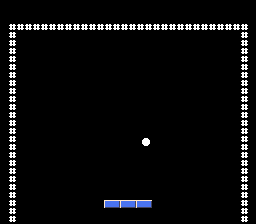
5. Bounce off the paddle
A paddle contact must be downward, cross the paddle's top from above, and overlap horizontally. Otherwise a missed ball could bounce off the paddle from underneath.
Open src\game.c
Add paddle_bounce between move_ball_x and move_ball_y in src\game.c, then extend the existing Y movement's if/else chain:
Goal: Select an upward rebound from the ball's contact point on the paddle.
src\game.c — add this complete paddle_bounce function immediately before move_ball_y:
static void paddle_bounce(Game *game)
{
int hit_position;
hit_position = game->ball_x + BALL_SIZE / 2 - game->paddle_x;
if (hit_position < PADDLE_WIDTH / 3)
{
game->vx = -2;
game->vy = -2;
}
else if (hit_position >= 2 * PADDLE_WIDTH / 3)
{
game->vx = 2;
game->vy = -2;
}
else
{
game->vx = game->vx < 0 ? -1 : 1;
game->vy = -3;
}
}The ball center selects the left, middle, or right third; the middle keeps its horizontal direction.
Goal: Bounce descending balls off the paddle's top, never from underneath.
src\game.c — in move_ball_y, apply these changes:
if (next_y < FIELD_TOP)
{
game->vy = -game->vy;
}
else
{
game->ball_y = next_y; if (next_y < FIELD_TOP)
{
game->vy = -game->vy;
}
else if (game->vy > 0 && game->ball_y + BALL_SIZE <= PADDLE_Y &&
next_y + BALL_SIZE > PADDLE_Y &&
game->ball_x + BALL_SIZE > game->paddle_x &&
game->ball_x < game->paddle_x + PADDLE_WIDTH)
{
game->ball_y = PADDLE_Y - BALL_SIZE;
paddle_bounce(game);
}
else
{
game->ball_y = next_y;We place the ball just above the paddle on contact. Its center determines the rebound zone:
| Paddle zone | vx | vy |
|---|---|---|
| Left third | -2 | -2 |
| Middle third | -1 or +1, keeping its horizontal direction | -3 |
| Right third | +2 | -2 |
This approximates shot angles without trigonometry. It does not preserve identical mathematical speed in every zone.
makeCheckpoint: let a descending ball hit the paddle. It bounces upward; hits near the left/right ends send it in those directions. Deliberately miss and verify that it still reattaches for another launch.
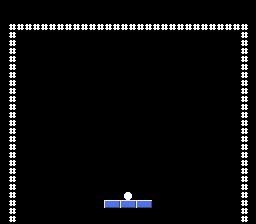
6. Add a wall of destructible bricks
Store the grid
Open src\game.h
Extend src\game.h with brick dimensions and data:
Goal: Define the brick grid's dimensions, position, and spacing.
src\game.h — in the file, apply these changes:
#define PADDLE_Y 200
#define PADDLE_SPEED 3
enum GameState
{
STATE_READY,#define PADDLE_Y 200
#define PADDLE_SPEED 3
#define BRICK_COLS 10
#define BRICK_ROWS 5
#define BRICK_COUNT (BRICK_COLS * BRICK_ROWS)
#define BRICK_X 30
#define BRICK_Y 48
#define BRICK_WIDTH 16
#define BRICK_HEIGHT 8
#define BRICK_PITCH_X 20
#define BRICK_PITCH_Y 16
enum GameState
{
STATE_READY,The pitch measures the distance between brick origins, including the gap.
Goal: Track live bricks and score independently of their graphics.
src\game.h — in the file, apply these changes:
int ball_y;
int vx;
int vy;
int state;
} Game;
void game_reset(Game *game); int ball_y;
int vx;
int vy;
unsigned int score;
int bricks_left;
int state;
unsigned char bricks[BRICK_COUNT];
} Game;
void game_reset(Game *game);bricks[index] is 1 when alive and 0 when destroyed. The pitch includes the gap: index = row * BRICK_COLS + col, X is BRICK_X + col * BRICK_PITCH_X, and Y is BRICK_Y + row * BRICK_PITCH_Y.
Open src\game.c
Initialize all bricks and score in src\game.c:
Goal: Restore all fifty bricks and clear the score on a new game.
src\game.c — in game_reset, apply these changes:
void game_reset(Game *game)
{
    game->paddle_x = (FIELD_LEFT + FIELD_RIGHT - PADDLE_WIDTH) / 2;
    game->state = STATE_READY;
    attach_ball(game);
}void game_reset(Game *game)
{
int i;
game->paddle_x = (FIELD_LEFT + FIELD_RIGHT - PADDLE_WIDTH) / 2;
game->score = 0;
game->bricks_left = BRICK_COUNT;
game->state = STATE_READY;
for (i = 0; i < BRICK_COUNT; ++i)
{
game->bricks[i] = 1;
}
attach_ball(game);
}The loop marks every brick alive while bricks_left caches the total.
Test candidate rectangles against live bricks
Two rectangles overlap only when all four inequalities hold:
Collision example — no file edit; read these inequalities:
x + BALL_SIZE > brick_x &&
x < brick_x + BRICK_WIDTH &&
y + BALL_SIZE > brick_y &&
y < brick_y + BRICK_HEIGHT
Merely touching an edge is not overlap. We reject non-overlapping rows first to avoid examining every brick when the ball is far from the wall.
Insert this complete helper between game_reset and move_ball_x in src\game.c. Then add its calls to the existing X/Y collision chains:
Goal: Remove the first live brick overlapping a candidate ball rectangle.
src\game.c — add this complete hit_brick function immediately before move_ball_x:
static int hit_brick(Game *game, int x, int y)
{
    int row;
    int col;
    int brick_x;
    int brick_y;
    int index;
    if (y + BALL_SIZE <= BRICK_Y ||
        y >= BRICK_Y + (BRICK_ROWS - 1) * BRICK_PITCH_Y + BRICK_HEIGHT)
    {
        return 0;
    }
    for (row = 0; row < BRICK_ROWS; ++row)
    {
        brick_y = BRICK_Y + row * BRICK_PITCH_Y;
        if (y + BALL_SIZE <= brick_y || y >= brick_y + BRICK_HEIGHT)
        {
            continue;
        }
        for (col = 0; col < BRICK_COLS; ++col)
        {
            index = row * BRICK_COLS + col;
            if (!game->bricks[index])
            {
                continue;
            }
            brick_x = BRICK_X + col * BRICK_PITCH_X;
            if (x + BALL_SIZE > brick_x && x < brick_x + BRICK_WIDTH)
            {
                game->bricks[index] = 0;
                game->score += 10;
                --game->bricks_left;
                return 1;
            }
        }
    }
    return 0;
}
The helper rejects distant rows, skips destroyed bricks, and awards ten points when it finds the first overlap.
Goal: Bounce horizontally when the next X position would enter a brick.
src\game.c — in move_ball_x, apply these changes:
    if (next_x < FIELD_LEFT || next_x + BALL_SIZE > FIELD_RIGHT)
    {
        game->vx = -game->vx;
    }


    else
    {
game->ball_x = next_x; if (next_x < FIELD_LEFT || next_x + BALL_SIZE > FIELD_RIGHT)
{
game->vx = -game->vx;
}
else if (hit_brick(game, next_x, game->ball_y))
{
game->vx = -game->vx;
}
else
{
game->ball_x = next_x;A hit reverses vx and rejects that candidate coordinate.
Goal: Apply the same brick collision test to vertical movement.
src\game.c — in move_ball_y, apply these changes:
    else if (game->vy > 0 && game->ball_y + BALL_SIZE <= PADDLE_Y &&
             next_y + BALL_SIZE > PADDLE_Y &&
             game->ball_x + BALL_SIZE > game->paddle_x &&
             game->ball_x < game->paddle_x + PADDLE_WIDTH)
    {
        game->ball_y = PADDLE_Y - BALL_SIZE;
        paddle_bounce(game);
    }


    else
    {
game->ball_y = next_y; else if (game->vy > 0 && game->ball_y + BALL_SIZE <= PADDLE_Y &&
next_y + BALL_SIZE > PADDLE_Y &&
game->ball_x + BALL_SIZE > game->paddle_x &&
game->ball_x < game->paddle_x + PADDLE_WIDTH)
{
game->ball_y = PADDLE_Y - BALL_SIZE;
paddle_bounce(game);
}
else if (hit_brick(game, game->ball_x, next_y))
{
game->vy = -game->vy;
}
else
{
game->ball_y = next_y;Each hit removes one live brick, adds ten points, and reverses the tested axis. The candidate position is rejected, so the ball is not left inside the brick.
Draw only changed bricks
Open src\main.c
Add the cache and renderer above draw_game in src\main.c, then call it after drawing the paddle. The initialization edit is next to oamClear:
Goal: Cache displayed brick states to avoid redundant sprite updates.
src\main.c — in file-scope declarations before draw_game, apply these changes:
extern u8 sprite_palette[];

Game game;
extern u8 sprite_palette[];

Game game;
static unsigned char shown_alive[BRICK_COUNT];
static int shown_bricks = -1;
The array tracks individual sprite visibility; the count detects changes in this single-level game.
Goal: Show restored bricks and hide destroyed ones when their state changes.
src\main.c — add this complete draw_bricks function immediately before draw_game:
static void draw_bricks(void)
{
    int index;
    int id;
    if (shown_bricks == game.bricks_left)
    {
        return;
    }
    for (index = 0; index < BRICK_COUNT; ++index)
    {
        if (shown_alive[index] == game.bricks[index])
        {
            continue;
        }
        id = (index + 4) * 4;
        if (game.bricks[index])
        {
            oamSet(id, BRICK_X + (index % BRICK_COLS) * BRICK_PITCH_X,
                   BRICK_Y + (index / BRICK_COLS) * BRICK_PITCH_Y, 3, 0, 0,
                   (index / BRICK_COLS) * 2, 0);
            oamSetEx(id, OBJ_LARGE, OBJ_SHOW);
        }
        else
        {
            oamSetVisible(id, OBJ_HIDE);
        }
        shown_alive[index] = game.bricks[index];
    }
    shown_bricks = game.bricks_left;
}
Brick slots follow the ball and paddle. Restoring a brick resets its position, tile, size, and visibility; destroying it hides its slot.
Goal: Synchronize brick sprites after drawing the moving objects.
src\main.c — in draw_game, apply these changes:
    for (i = 0; i < 3; ++i)
    {
        oamSetXY((i + 1) * 4, game.paddle_x + i * 16, PADDLE_Y);
    }

} for (i = 0; i < 3; ++i)
{
oamSetXY((i + 1) * 4, game.paddle_x + i * 16, PADDLE_Y);
}
draw_bricks();
}Calling draw_bricks keeps visibility in step with the latest collisions.
Goal: Initialize the brick cache to match the initially hidden sprite table.
src\main.c — in init_video, apply these changes:
    bgSetDisable(1);
    bgSetDisable(2);
    oamClear(0, 0);


    oamSet(0, game.ball_x, game.ball_y, 3, 0, 0, 12, 0);
    oamSetEx(0, OBJ_SMALL, OBJ_SHOW);
for (i = 0; i < 3; ++i) bgSetDisable(1);
bgSetDisable(2);
oamClear(0, 0);
for (i = 0; i < BRICK_COUNT; ++i)
{
shown_alive[i] = 0;
}
oamSet(0, game.ball_x, game.ball_y, 3, 0, 0, 12, 0);
oamSetEx(0, OBJ_SMALL, OBJ_SHOW);
for (i = 0; i < 3; ++i)Brick rows start at tiles 0, 2, 4, 6, and 8. A 16-by-16 sprite at tile 0 uses tiles 0, 1, 16, and 17; it does not use four consecutive tile numbers.
The cache starts at zero because all sprites are initially hidden. Defining a restored brick with oamSet also restores its position: hiding a sprite moves it offscreen, so simply showing it again is insufficient.
The scene uses 54 of the SNES's 128 sprite entries. On a brick scanline there are at most eleven sprites and 21 eight-pixel tile slivers, below the limits of 32 sprites and 34 slivers. Transparent lower halves still count toward hardware limits; the 16-pixel vertical pitch keeps rows from overlapping.
makeCheckpoint: fifty bricks appear in five colored rows. Hits remove bricks and rebound the ball; misses preserve the damage. Score is being accumulated, but is not displayed yet. Clearing the wall does not end play yet either.
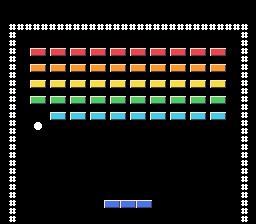
7. Add lives, winning, and restarting
Open src\game.h
Add the game-over and win states and life count in src\game.h:
Goal: Represent game over and victory as states that stop normal play.
src\game.h — in the file, apply these changes:
enum GameState
{
    STATE_READY,
    STATE_PLAYING


};

typedef struct Gameenum GameState
{
STATE_READY,
STATE_PLAYING,
STATE_GAME_OVER,
STATE_WON
};
typedef struct GameThe enum now includes game-over and win states alongside ready and playing.
Goal: Store the number of remaining lives across individual misses.
src\game.h — in the file, apply these changes:
    int vx;
    int vy;
    unsigned int score;

    int bricks_left;
    int state;
unsigned char bricks[BRICK_COUNT]; int vx;
int vy;
unsigned int score;
int lives;
int bricks_left;
int state;
unsigned char bricks[BRICK_COUNT];lives persists when a new ball is attached; only a new game resets it.
Open src\game.c
In src\game.c, initialize lives, detect the last brick, and add lose_lifebetween move_ball_y and game_tick. Finally replace the temporary offscreen reset and add state checks inside the substep loop:
Goal: Give each new game three lives.
src\game.c — in game_reset, apply these changes:
    game->paddle_x = (FIELD_LEFT + FIELD_RIGHT - PADDLE_WIDTH) / 2;
    game->score = 0;

    game->bricks_left = BRICK_COUNT;
    game->state = STATE_READY;
    for (i = 0; i < BRICK_COUNT; ++i)
    game->paddle_x = (FIELD_LEFT + FIELD_RIGHT - PADDLE_WIDTH) / 2;
    game->score = 0;
    game->lives = 3;
    game->bricks_left = BRICK_COUNT;
    game->state = STATE_READY;
    for (i = 0; i < BRICK_COUNT; ++i)
Resetting restores lives along with score and bricks.
Goal: End play as soon as the last brick is destroyed.
src\game.c — in hit_brick, apply these changes:
                game->bricks[index] = 0;
                game->score += 10;
                --game->bricks_left;


                return 1;
            }
} game->bricks[index] = 0;
game->score += 10;
--game->bricks_left;
if (game->bricks_left == 0)
{
game->state = STATE_WON;
}
return 1;
}
}A zero live count switches the game to STATE_WON.
Goal: Charge one life per miss and either reattach the ball or end the game.
src\game.c — add this complete lose_life function immediately before game_tick:
static void lose_life(Game *game)
{
    --game->lives;
    if (game->lives == 0)
    {
        game->state = STATE_GAME_OVER;
    }
    else
    {
        game->state = STATE_READY;
        attach_ball(game);
    }
}
Only a nonfinal miss attaches another ball; both paths preserve score and bricks.
Goal: Keep the game-over or win screen visible until a new B or Start press restarts the game.
src\game.c — in game_tick, apply these changes:
void game_tick(Game *game, int movement, int action_pressed)
{
    int step;


    game->paddle_x += movement * PADDLE_SPEED;
if (game->paddle_x < FIELD_LEFT)void game_tick(Game *game, int movement, int action_pressed)
{
int step;
if (game->state == STATE_GAME_OVER || game->state == STATE_WON)
{
if (action_pressed)
{
game_reset(game);
}
return;
}
game->paddle_x += movement * PADDLE_SPEED;
if (game->paddle_x < FIELD_LEFT)Returning immediately prevents paddle movement and keeps the restart press from launching the newly attached ball.
Goal: Stop substeps on victory and deduct a life when the ball falls offscreen.
src\game.c — in game_tick, apply these changes:
        return;
    }


    for (step = 0; step < BALL_SUBSTEPS; ++step)
    {
        if (step < magnitude(game->vx))
        {
            move_ball_x(game);
        }


        if (step < magnitude(game->vy))
        {
            move_ball_y(game);
        }


        if (game->ball_y >= FIELD_BOTTOM)
        {
            game->state = STATE_READY;
            attach_ball(game);
            return;
        }
} return;
}
/* Check each pixel, rather than jumping across a thin brick. */ // [!code ++]
for (step = 0; step < BALL_SUBSTEPS; ++step)
{
if (step < magnitude(game->vx))
{
move_ball_x(game);
}
if (game->state != STATE_PLAYING)
{
return;
}
if (step < magnitude(game->vy))
{
move_ball_y(game);
}
if (game->state != STATE_PLAYING)
{
return;
}
if (game->ball_y >= FIELD_BOTTOM)
{
lose_life(game);
return;
}
}Those early returns matter: once the last brick is destroyed, remaining substeps must not keep moving or changing the score.
READY --new B/Start press--> PLAYING
PLAYING --miss with lives left--> READY
PLAYING --last miss--> GAME_OVER
PLAYING --last brick--> WON
GAME_OVER or WON --new B/Start press--> fresh READY
A missed ball costs one life and preserves score/bricks. A new game restores everything, including the centered paddle. Restarting returns immediately, so a separate button press is needed to launch again.
makeCheckpoint: miss three times, relaunching between misses. After the third, paddle movement stops. Release and press B/Start: all bricks return and the ball reattaches. Release and press again to launch. There are no status messages yet; we will make these states visible next.
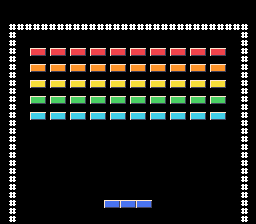
8. Draw the score, lives, and prompts
Text should update when values change, not on every pixel movement. The maximum score is 50 times 10, or 500, so a three-digit string is enough.
Open src\main.c
In src\main.c, add the text buffers and caches next to the brick cache:
Goal: Hold printable score and life digits and track when they need redrawing.
src\main.c — in file-scope declarations before draw_bricks, apply these changes:
Game game;

static unsigned char shown_alive[BRICK_COUNT];


static int shown_bricks = -1;
Game game;

static unsigned char shown_alive[BRICK_COUNT];
static char score_text[] = "000";
static char lives_text[] = "3";
static int shown_bricks = -1;
static int shown_score = -1;
static int shown_lives = -1;
static int shown_state = -1;
The buffers include their terminating zero byte; -1 cache values force the first HUD update.
Now insert draw_text between draw_bricks and draw_game, call it at the end of draw_game, and add the HUD labels above the border:
Goal: Display changed score and lives and choose prompts from the game state.
src\main.c — add this complete draw_text function immediately before draw_game:
static void draw_text(void)
{
    if (shown_score != game.score)
    {
        score_text[0] = '0' + game.score / 100;
        score_text[1] = '0' + (game.score / 10) % 10;
        score_text[2] = '0' + game.score % 10;
        consoleDrawText(8, 1, score_text);
        shown_score = game.score;
    }
    if (shown_lives != game.lives)
    {
        lives_text[0] = '0' + game.lives;
        consoleDrawText(20, 1, lives_text);
        shown_lives = game.lives;
    }
    if (shown_state == game.state)
    {
        return;
    }
    consoleDrawText(3, 18, "                          ");
    consoleDrawText(3, 20, "                          ");
    if (game.state == STATE_READY)
    {
        consoleDrawText(7, 18, "B / START TO LAUNCH");
        consoleDrawText(6, 20, "LEFT / RIGHT TO MOVE");
    }
    else if (game.state == STATE_GAME_OVER)
    {
        consoleDrawText(11, 18, "GAME OVER");
        consoleDrawText(7, 20, "B / START: NEW GAME");
    }
    else if (game.state == STATE_WON)
    {
        consoleDrawText(12, 18, "YOU WIN!");
        consoleDrawText(7, 20, "B / START: NEW GAME");
    }
    shown_state = game.state;
}
The renderer writes decimal digits directly and clears old messages with spaces before selecting the new state's prompts.
Goal: Keep the HUD synchronized with the latest gameplay tick.
src\main.c — in draw_game, apply these changes:
        oamSetXY((i + 1) * 4, game.paddle_x + i * 16, PADDLE_Y);
    }
    draw_bricks();

} oamSetXY((i + 1) * 4, game.paddle_x + i * 16, PADDLE_Y);
}
draw_bricks();
draw_text();
}Calling draw_text every frame avoids unnecessary transfers when its cache matches.
Goal: Label the score and lives above the playfield.
src\main.c — in init_video, apply these changes:
        oamSetEx((i + 1) * 4, OBJ_LARGE, OBJ_SHOW);
    }


    consoleDrawText(1, 3, "##############################");
    for (row = 4; row < 28; ++row)
{ oamSetEx((i + 1) * 4, OBJ_LARGE, OBJ_SHOW);
}
consoleDrawText(2, 1, "SCORE LIVES");
consoleDrawText(1, 3, "##############################");
for (row = 4; row < 28; ++row)
{The string initializers already include the terminating zero byte. Writing digits directly avoids printf-style formatting in the game loop. Clearing messages with spaces prevents remnants when a new message is shorter.
The existing draw_game() call in init_video now draws the initial HUD before turning the screen on. The main loop already calls it each frame; no other call sites need to change.
makeCheckpoint: the ready screen shows score 000, lives 3, and launch/move prompts. Launching clears the prompts. Hits add ten points; misses decrease lives. Game over displays a restart prompt.
Troubleshooting
| Symptom | Check |
|---|---|
| SDK not found | Your project belongs at <SDK root>\snes-examples\breakout. The SDK root (the folder that directly contains devkitsnes) must also contain pvsneslib and snes-examples. If PVSNESLIB_HOME is set in your environment, it overrides the Makefile default and must name that folder in /c/... form. |
| Build cannot find shell utilities | Use MSYS2 UCRT64 on Windows and install GNU Make. |
No targets specified and no makefile found | Run make from your project directory; ls should list Makefile. Check that your editor did not save it as Makefile.txt. |
Many Label ... defined more than once or DISCARD lines | Harmless linker messages. The build succeeded if it ends with Build finished successfully !. |
missing separator | Makefile command recipes need tabs; do not paste diff markers. |
| A malformed library path during linking | Keep paths free of spaces. Use an absolute MSYS2 SDK path, such as /c/snesdev/pvsneslib, not Windows backslashes in PVSNESLIB_HOME. |
| Undefined function/field | Apply the steps in order; check the file and neighboring code named in the diff. |
| Old behavior after rebuilding | Open the ROM from your new learner project, not the reference repository or Hello World directory. |
| No controller response | Configure controller 1, focus the emulator, and keep WaitForVBlank in the loop. |
| Ball freezes after launching in step 3 | Expected until step 4 adds movement. |
| Ball passes through paddle in step 4 | Expected until step 5 adds paddle collisions. |
| Bricks disappear but no score is visible in step 6 | Expected until step 8 adds the HUD. |
| Scrambled artwork | Preserve the indexed sheet and tile order; use the specified converter options. |
| Unexpected sprite lower half | Tiles 16 through 31 should be transparent. |
| Restored bricks stay offscreen | Restore positions with oamSet, not visibility alone. |
| Parts of a larger wall disappear | Check scanline sprite/sliver limits, including transparent sprite areas. |
| Corrupt text/sprites after moving graphics | Check for overlapping VRAM allocations. |
| Slower on PAL | Speeds are frame-based and NTSC-tuned; compensation is not implemented. |
If you change the sheet dimensions or palette size, change the upload lengths in your init_video too. Do not upload 1,024 bytes from a smaller asset.
Continue the series
Once all checkpoints pass, continue with Part 2, which adds background layers, bricks stored in the tile map, animated dynamic sprites, music, and sound effects. After that, try multiple level arrays, a paused state, or PAL timing compensation. Make one change, rebuild, and repeat relevant tests.
Official references
- PVSnesLib 4.6.0 release
- Installation guide
- Compiling Hello World
- ROM header configuration
- Sprite and OAM API (
sprite.h) - Background API (
background.h) - Text console API (
textfont.h) - Controller input API (
input.h) - VBlank and interrupts (
interrupt.h) - gfx4snes options, pinned to 4.6.0
- SimpleSprite example, pinned to 4.6.0
The header links are pinned to 4.6.0. The same headers are installed in pvsneslib\include\snes inside your SDK root. The generated online API documentation describes the latest release, which may differ from 4.6.0.
Next: Part 2 — backgrounds, dynamic sprites, and sound · Series site